Golden Technologies lift chairs use Comfort Zone Technology to make standing, sitting, and reclining easier for you while addressing mobility challenges, arthritis, and chronic pain. This article outlines how each Comfort Zone targets specific body areas, explains Twilight Technology’s weightless zero-gravity positions, and helps you compare features so you can choose the best recliner for your needs.
You’ll learn how Comfort Zone 1’s 4-way seat motion eases lower-body strain, Zone 2’s independent backrest relieves upper-body tension, Zone 4’s adjustable lumbar support reduces spinal pressure, and Zone 5’s Twilight Technology promotes circulation and a nearly weightless feel. After reading, you’ll be ready to explore popular models and find options or discounts from Suncoast Mobility that match your lifestyle.

Comfort Zone Technology Overview
Comfort Zones are a set of targeted ergonomic features built into Golden Technologies lift chairs that let you fine-tune how the chair supports different parts of your body. Rather than thinking of a recliner as a single piece of furniture, Golden divides comfort into discrete zones—seat, backrest, legs, lumbar, and specialized reclining positions—so you can address specific needs like pressure relief, posture support, and easier transitions from sitting to standing.
Definition of Comfort Zones and how Golden Technologies organizes them
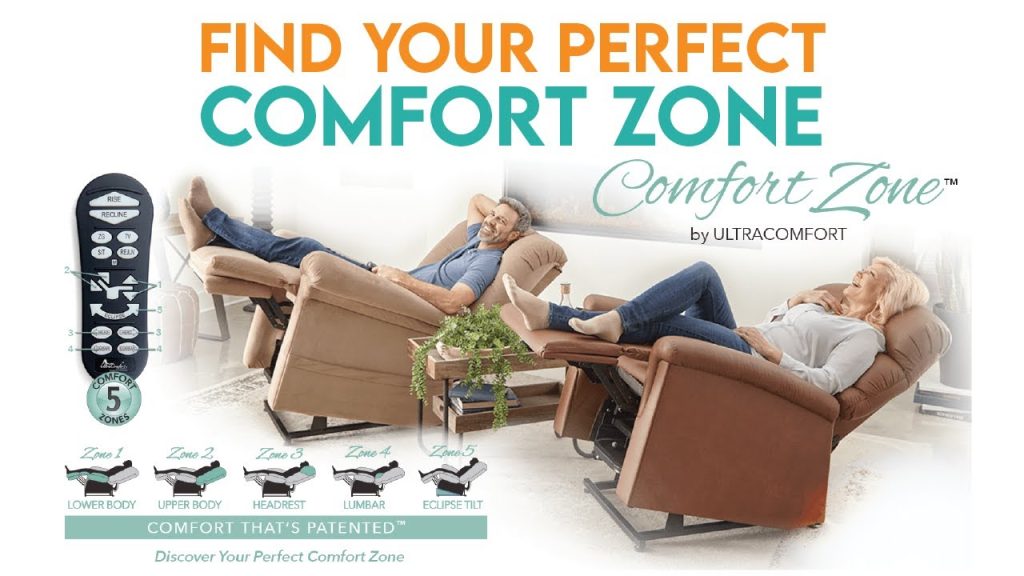
Comfort Zones are distinct functional areas of the chair that can be adjusted independently or in coordination to optimize comfort and mobility. Golden Technologies typically labels these zones numerically (Comfort Zone 1 through 5) and maps each one to a particular mechanical or cushion-based function—seat motion, backrest articulation, leg and foot positioning, lumbar support, and Twilight/weightless positions—making it straightforward for you to understand which adjustment addresses which complaint.
Purpose: ergonomic support, mobility assistance, and pressure relief
The main purpose of Comfort Zones is threefold: provide ergonomic support to reduce strain and maintain healthy alignment, assist mobility by making standing and sitting transitions safer and easier, and reduce pressure points to help prevent discomfort and skin issues during prolonged sitting. When you use these zones together, they can greatly improve daily comfort, independence, and overall quality of life.
How Comfort Zones integrate with lift mechanisms and recline functions
Comfort Zones are engineered to work seamlessly with the chair’s lift and recline mechanics. Lift mechanisms gently tilt and raise the entire seat while individual motors or linkages control backrest and legrest positions; this coordinated movement means transitions feel smooth and controlled rather than jarring. You’ll notice that the chair’s lift function can be combined with seat tilt, lumbar adjustment, and Twilight positions to create tailored, gravity-assisted postures that reduce effort and stress on joints.
Summary of commonly referenced zones and their intended targets
Commonly referenced Comfort Zones include: Zone 1 — four-way seat motion for pelvis and thighs; Zone 2 — independent backrest movement for upper back and shoulders; Zone 3 — leg and foot support for circulation and swelling reduction; Zone 4 — adjustable lumbar for lower spine support; and Zone 5 — Twilight or zero-gravity positions for full-body weightless relief. Each is targeted to a region of the body and a functional outcome like pressure redistribution, postural alignment, or ease of transfer.
Why Comfort Zones matter for users with arthritis, chronic pain, or limited mobility
If you live with arthritis, chronic pain, or limited mobility, comfort zones matter because they let you adapt the chair to your specific pain points and functional limitations. For example, precise lumbar support can reduce lower back flare-ups, leg elevation can minimize edema and joint pain, and lift-assisted seat tilt reduces the muscular effort required to stand. That customization helps you stay comfortable for longer periods and maintain independence with less caregiver assistance.
Comfort Zone 1: Four-Way Seat Motion
Comfort Zone 1 focuses on dynamic seat positioning to support the lower body and improve transitions.
What four-way seat motion means (seat tilt, forward/back, lift assistance)
Four-way seat motion generally refers to the seat’s ability to tilt, move slightly forward or backward, and integrate with the lift mechanism to assist standing. The combination may include a powered seat tilt that angles your hips forward, a sliding or articulating base for forward/back adjustment, and synchronized lift action so the seat both rises and angles to reduce the effort needed to stand.
How lower-body support reduces muscle and joint pain
When your hips, thighs, and pelvis are supported correctly, muscles don’t have to overcompensate to maintain posture. Proper seat tilt and support reduce shear forces on hip and knee joints, minimize compression across the pelvis, and lower muscular fatigue. This is especially helpful when you need to sit for long periods or when joint pain flares up.
Benefits for sitting-to-standing transitions and stability
A four-way seat makes standing easier by positioning your center of gravity in a way that reduces the torque required at the knees and hips. The forward tilt and lift assistance shorten the distance and effort to rise, improving stability during the transition and decreasing the chance of slips or falls. You’ll feel safer and more confident when getting in and out of the chair.
Typical user scenarios and conditions that benefit most
Users who benefit most include people with knee or hip osteoarthritis, reduced quadriceps strength, Parkinson’s-related mobility issues, post-op recovery needs, or general frailty. If rising from a low or deep seat is painful or difficult for you, a four-way seat motion system can make daily activities much more manageable.
What to look for when testing seat motion in person
When you test a chair, look for smooth, controlled motion without jerking, adequate support under the thighs (without pressure behind the knees), and a seat depth and tilt that feel natural for your proportions. Try different seat tilt angles and perform a full sit-to-stand to evaluate stability. Also note how well the mechanism aligns with your preferred sitting height and if the controller is easy for you to operate.

Comfort Zone 2: Independent Backrest Movement
Comfort Zone 2 gives you targeted control over upper body support through a backrest that moves independently from the seat.
Explanation of independent backrest articulation
Independent backrest articulation means the back section of the chair can recline or adjust at its own rate and angle, separate from the seat and legrest. This lets you change upper-body posture—like reclining slightly to relieve shoulder tension—without altering the seat’s position or lift function.
How it relieves upper body tension and supports back and shoulders
By allowing the backrest to be positioned precisely, you can offload tension from your shoulders, upper back, and neck. For example, a slight recline with appropriate head and thoracic support can reduce trapezius strain and allow your scapulae to relax, which helps relieve chronic upper-back pain and reduces headaches caused by tension.
Adjustability options and common control interfaces
Backrest adjustments may be controlled via simple wired remotes with multiple preset positions, handheld remotes with toggles, or multi-button panels that let you fine-tune angles. Some models offer independent motors for backrest and legrest, while less complex chairs use linked mechanisms—both can be effective if you have intuitive controls you can handle comfortably.
Impacts on posture, breathing, and relaxation
Proper backrest positioning supports a more neutral spine, which improves breathing by allowing your diaphragm to expand more freely and reduces compression on the chest. You’ll notice easier deep breaths and a greater sense of relaxation when your upper back is supported, which also benefits sleep quality for daytime naps and restorative rest.
Tips for setting backrest position for therapeutic benefit
Start by finding a position where your shoulders and upper back feel supported without rounding your lower back. If you have shoulder tension, experiment with small reclines and add a small pillow at the upper thoracic level. For breathing benefits, avoid extreme forward slouching—aim for a gentle recline that opens the chest. If unsure, ask a therapist to help identify optimal angles.
Comfort Zone 3: Leg and Foot Support (Positioning and Circulation)
Comfort Zone 3 addresses the positioning of your legs and feet to promote circulation and reduce swelling.
Role of legrest and foot positioning in overall comfort
The legrest and foot support control how your lower legs are elevated and supported, which directly affects comfort, pressure distribution, and venous return. Proper leg positioning takes pressure off the thighs and redistributes it to larger surface areas, reducing hotspots and improving comfort during extended sitting.
How adjustable leg and foot support improves circulation and reduces swelling
Elevating your legs gently above heart level or to a comfortable, non-constricting angle helps encourage venous return and reduces pooling of fluid in the lower extremities. Adjustable legrests let you change elevation throughout the day, which breaks up static positions and helps prevent edema and associated discomfort.
Common legrest designs (split, full-length, extension) and their benefits
Common designs include split legrests that allow independent adjustment for each leg (helpful if one leg needs a different angle), full-length legrests that support the entire lower limb, and extension panels that accommodate taller users. Split legrests are great for uneven swelling or injuries; full-length provides uniform support and pressure distribution; extensions ensure comfort for taller individuals.
Combining leg support with other Comfort Zones for pressure relief
For best pressure relief, combine leg elevation with seat tilt and lumbar support to create a pressure-redistributing posture. For example, using a slight seat tilt (Comfort Zone 1) while elevating legs (Zone 3) and supporting the lumbar area (Zone 4) spreads pressure across larger surfaces and reduces concentrated load on any single point.
How to measure and select the right legrest configuration for a user
Measure from your back to the back of your knee and from knee to heel while sitting to determine ideal seat depth and legrest length. Consider whether you need split control for asymmetrical conditions, and verify that the legrest can fully support your calves without pressure behind the knees. When testing, ensure circulation feels improved—no numbness, pins-and-needles, or increased swelling.

Comfort Zone 4: Adjustable Lumbar Support
Comfort Zone 4 provides focused support to the lower spine to reduce spinal loading and improve alignment.
What adjustable lumbar support does and why spinal pressure matters
Adjustable lumbar support fills the natural curve of your lower back to maintain neutral spinal alignment. Proper lumbar support reduces compressive forces on the intervertebral discs and decreases muscular strain in the lower back. Since spinal pressure is a common source of chronic pain, addressing lumbar posture can provide significant relief.
Mechanisms used for lumbar adjustment (air cell, mechanical, motorized)
Lumbar adjustment can be achieved through inflatable air cells that let you increase or decrease pressure, mechanical supports like adjustable wedges or dials, and motorized systems that reposition the lumbar area at the push of a button. Each method offers different levels of precision and user convenience.
Benefits for chronic lower back pain and spinal alignment
Supporting the lumbar curve reduces the workload on paraspinal muscles and preserves disc spacing, which can lower pain intensity and frequency for people with degenerative disc disease, chronic low back pain, or posterior pelvic tilt. Regular use can also train you to maintain better posture outside the chair.
How to adjust lumbar support properly for comfort and relief
Adjust the lumbar support so it gently fills the small of your back without pushing you forward or causing hyperlordosis. Increase support in small increments and sit for several minutes after each change to assess relief. If you feel increased pressure or discomfort, reduce the support; the aim is balanced, sustained comfort.
Compatibility with cushions, pads, and medical prescriptions
Many chairs accept aftermarket lumbar cushions or prescribed orthotic pads if you need a specific firmness or contour based on medical advice. Check compatibility with removable covers and seat depth; you can often combine factory lumbar systems with clinician-recommended supports if your healthcare provider prescribes a particular shape or density.
Comfort Zone 5: Twilight Technology and Weightless Positions
Comfort Zone 5 creates weightless, zero-gravity-like postures designed to maximize relaxation and physiological benefit.
Description of Twilight Technology and zero-gravity recline angles
Twilight Technology refers to proprietary recline patterns that place your body in positions similar to zero-gravity—your knees slightly above or level with your heart and a gentle recline that distributes body weight evenly. These positions are designed to feel “weightless,” reducing pressure on the spine and joints.
How weightless positioning promotes circulation and pain relief
By redistributing your body weight and elevating your legs, weightless positions reduce spinal compression and help venous return from the legs to the heart. This lowers edema and reduces strain on the lower back and hip joints, often resulting in immediate sensations of reduced pain and improved comfort.
Physiological benefits: reduced spinal loading and improved venous return
Physiologically, these positions reduce axial loading of the spine, which can decrease disc pressure and muscle tension. At the same time, improved venous return reduces pooling in the lower limbs, lessens swelling, and can lower the risk of discomfort associated with poor circulation.
Typical use cases: relaxation, post-surgery recovery, daytime rest
Twilight and weightless positions are ideal for relaxation, stress reduction, post-surgical recovery where gentle elevation is recommended, daytime rest for people with circulatory issues, and for anyone seeking relief from chronic musculoskeletal pain. They’re particularly useful when you need a restorative position without lying flat.
Testing Twilight positions and personalizing the recline experience
When testing, move slowly through the recline presets to find the angle that feels most “weightless” to you. Pay attention to pressure points and breathing: the best position will feel open in the chest and light in the limbs. Most chairs let you save preferred settings so you can return to a personalized Twilight angle easily.

Lift Mechanism and Motor Features
This section covers the hardware that makes lift chairs function reliably and quietly.
Types of lift mechanisms used in Golden lift chairs (two-, three-, four-motor systems)
Golden chairs commonly use multi-motor systems: two-motor designs typically separate the footrest and backrest, three-motor systems add independent seat or tilt control, and four-motor systems allow even finer control—separating footrest, backrest, seat tilt, and lift functions. More motors usually mean greater customization and smoother, more precise positioning.
Motor power, speed, and reliability considerations
Motor power affects how easily the chair lifts heavier users and how smoothly it handles transitions; speed influences how fast positions change. You’ll want motors that balance brisk, confident motion with safety—too fast can feel unsafe, too slow can be frustrating. Look for reputable manufacturers, warranties, and user reviews to gauge long-term reliability.
Battery backup options and safety during power outages
Many lift chairs offer battery backup kits that allow you to return the chair to the upright position during a power outage. This is critical if you rely on the lift function to stand. Check whether the accessory is included or optional and ensure the battery is easy to access and maintain.
Noise, maintenance, and expected lifespan of motors
Higher-quality motors operate quietly and require minimal maintenance beyond keeping the chair clean and avoiding obstructions. Noise levels vary by model—test in person if quiet operation is important to you. With normal use and proper maintenance, motors can last many years; warranties and service plans offer added peace of mind.
How motors work together with Comfort Zones for smooth transitions
Motors coordinate to execute Comfort Zone adjustments smoothly—lifting while tilting the seat slightly, adjusting lumbar as the backrest moves, and extending the legrest in sync. This coordinated action prevents awkward positions and makes transitions feel natural, reducing stress on your body and lowering the risk of loss of balance.
Upholstery, Cushions, and Pressure Management
Material choices and cushion design are essential for skin health, durability, and overall comfort.
Common upholstery materials and their pros/cons (leather, faux leather, fabric)
Leather provides a premium look and is easy to wipe clean, but can be warm and more expensive. Faux leather (vinyl or polyurethane) mimics leather at a lower cost and is often stain-resistant but may be less breathable. Fabric covers are breathable and comfortable in varied climates but can be harder to clean and may wear faster without protective treatments.
Foam density, memory foam options, and pressure-relief cushions
Foam density determines support and longevity: higher-density foams last longer and provide firmer support, while memory foam contours to your body to reduce pressure points. Some chairs combine multiple foam layers and include specialized pressure-relief cushions aimed at users at risk for pressure ulcers. Choose foam that balances comfort, support, and durability for your needs.
Stain resistance, cleaning recommendations, and durability
Look for stain-resistant fabrics or performance textiles that repel liquids and are easy to clean. For leather and faux leather, gentle wiping and occasional conditioner or cleaner are recommended. For fabric, follow manufacturer care instructions—removable covers can simplify cleaning and extend the life of the upholstery.
Specialty options for skin-sensitive users and pressure ulcer prevention
For skin-sensitive users or those at risk of pressure ulcers, consider breathable fabrics, gel-infused memory foams, alternating pressure cushions, or specialized covers designed to wick moisture and reduce shear. Always check product specifications and communicate any medical needs to your dealer so you can match chair features to your health profile.
Removable covers and customization choices
Many models offer removable covers, color choices, and upgrade options—like heated seats, massagers, or antimicrobial finishes—so you can personalize aesthetics and function. Removable covers also make it easier to clean or replace worn upholstery without replacing the whole chair.

Safety, Accessibility, and User Profiles
Safety features and correct sizing are crucial for ensuring the chair meets your needs.
Weight capacity, dimensions, and recommended user measurements
Check the chair’s weight capacity and frame size to ensure it supports you safely. Measure your hip width, thigh length, and overall height to choose an appropriate seat width, depth, and back height. Getting these dimensions right avoids pressure at the knees or inadequate back support.
Safety features: seat belts, slow start/stop, anti-tipping design
Safety features to look for include optional seat belts for users prone to sliding, soft start/stop motor control to avoid abrupt motion, and stable, anti-tip bases designed to prevent falls during transitions. These features add confidence and protect against accidents, especially for higher-risk users.
Accessibility considerations for caregivers and limited dexterity users
Easy-to-use remotes, preset memory positions, and simple mechanical releases are important if you or a caregiver has limited dexterity. Removable arms or transfer handles can simplify lateral transfers. Also consider how easy it is to access power cords or batteries and whether the chair’s controls are reachable from your seated position.
Which medical conditions and mobility levels are best matched to specific zones
Comfort Zone 1 is beneficial for joint weakness and transfer difficulty; Zone 2 helps those with upper back or neck tension; Zone 3 supports people with circulatory issues or edema; Zone 4 assists chronic low back pain; Zone 5 is suited for post-op recovery and generalized pain relief. Match zones to your primary condition and consult a clinician if you have multiple or complex health needs.
Guidance on consulting healthcare professionals before purchase
Before buying, consult your physician, physical therapist, or an occupational therapist—especially if you have recent surgery, unstable medical conditions, or high risk for pressure ulcers. A clinician can recommend optimal features, verify measurements, and advise on any therapeutic cushions or prescriptions to ensure the chair meets your clinical needs.
Conclusion
The final section wraps up what you should take away about Comfort Zones and choosing the right lift chair.
Recap of what Golden Technologies Comfort Zones are and their benefits
Golden Technologies’ Comfort Zones break chair function into targeted, user-focused areas—seat movement, back articulation, leg/foot support, lumbar adjustment, and Twilight positions—each designed to address common problems like pain, poor circulation, and difficulty standing. Together they offer a customizable approach to long-term comfort and mobility.
How Comfort Zones work together with lift mechanisms to enhance mobility
Comfort Zones integrate with the chair’s lift and motor systems to produce smooth, safe transitions and posture adjustments that reduce muscular effort and joint stress. When the zones are used in combination, they create therapeutic positions that help you perform daily tasks with greater independence and less discomfort.
Key considerations when selecting and testing a lift chair
When selecting a chair, prioritize correct sizing, motor quality, appropriate Comfort Zone features for your medical needs, upholstery that suits your lifestyle, and safety elements like battery backup and anti-tip design. Test chairs in person to evaluate motion smoothness, noise level, and whether the controls feel intuitive given your dexterity.
Next steps: try models in person, consult clinicians, and contact dealers
Your next steps should be to try several models in person, bring measurements and any clinician recommendations with you, and test not only static comfort but dynamic functions like sit-to-stand transitions and Twilight reclines. Ask dealers about trial periods, warranties, and service options.
Contact pointers for discounts, demos, and further information
Contact authorized dealers or the manufacturer’s certified retailers to arrange demos, inquire about available discounts, and learn about in-home tryout options or delivery services. If you need clinical guidance, bring a healthcare provider’s input when speaking with dealers so they can help match a chair’s Comfort Zones and accessories to your specific needs.
You now have a practical, user-centered overview of Golden Technologies Comfort Zones and what to look for when choosing a lift chair that supports your comfort, safety, and independence.
Call us at 727-537-6275 for your discount
Discover how Golden Technologies lift chairs use advanced Comfort Zone Technology to provide unmatched ergonomic support for users with mobility challenges, arthritis, chronic pain, and more.
A lift chair recliner is specially engineered to assist users in standing up with minimal effort, thanks to its powerful lifting mechanism. But Golden’s innovation doesn’t stop there—their Comfort Zones are what set them apart.
💺 Comfort Zones Overview:
Comfort Zone 1: 4-way seat motion supports the lower body and reduces muscle and joint pain.
Comfort Zone 2: Independent backrest movement relieves upper body tension and supports the back and shoulders.
Comfort Zone 4: Adjustable lumbar support reduces spinal pressure and allows your back to fully rest.
Comfort Zone 5: Exclusive Twilight Technology offers a weightless experience and promotes circulation and pain relief with multiple zero-gravity recline positions.
These zones are designed to enhance daily living and maximize comfort during extended use.
Looking for a premium lift chair? Call Suncoast Mobility today or explore more online to find the perfect fit for your lifestyle!
Articles:
Golden Technologies Lift Chair Recliners: Combining Comfort, Innovation, and Accessibility:
Popular Lift Chair models:
Cloud w/ Twilight PR515-MLA:
Cloud PR510:
Call us at 727-537-6275 for your discount
Find Suncoast Mobility:
Website:
Instagram: / suncoast_mobility
Facebook: / suncoast-mobility-100063807210343
Twitter:
YouTube: / @suncoastmobility1051
Better Business Bureau:
LinkedIn: / suncoast-mobility-00017034a
Pinterest: / suncostmobility
Reddit: / ok-ingenuity6545